Introducing Launcher 2.0
Sep 28, 2025
The Uneekor Launcher software has been revamped and upgraded to optimize your experience when playing the golf you love. It is your all-in-one software hub for virtual golf, both indoor and outdoor. It’s where you install, launch, and manage your favorite software such as Game Day, VIEW, Refine/Refine+, AI Trainer, GSPRO and more, while also keeping your Uneekor launch monitors and software organized and up to date.
What We Changed in Launcher 2.0
We rebuilt it for three big reasons: A modern foundation for growth, a consistent experience for our users, and a clearer, faster journey. We transitioned to an intuitive view-based architecture to dramatically improve maintainability and scalability, so we can deliver updates and new features faster over time. The new Launcher reflects Uneekor’s design philosophy for a more cohesive experience across devices and software, while also redesigning the screens around actual user flows to improve usability end-to-end and UI consistency.
- Unified Onboarding Flow: A streamlined sign-in and account creation experience for easier access.
- Step-by-Step Guidance: Clear instructions and prioritized action buttons reduce confusion and help you get set up faster.
- Optimized Visual Experience: A modern, visually driven interface that puts your goals first and makes navigation effortless.
- Centralized Settings & Enhanced Accessibility: All settings consolidated into one simple layout, with card/list-style UI for easier discovery and faster adjustments.
Key Benefits for Virtual Golfers
Firstly, this provides faster installs with a straightforward process. Included in the Launch monitor setup process, as well as any accessories you may use such as the swing optix™, is a guided device setup walks you from selecting your hardware to connecting, licensing, calibrating, and a smooth finish, complete with real-time feedback and one-click license activation for subs or perpetual licenses.
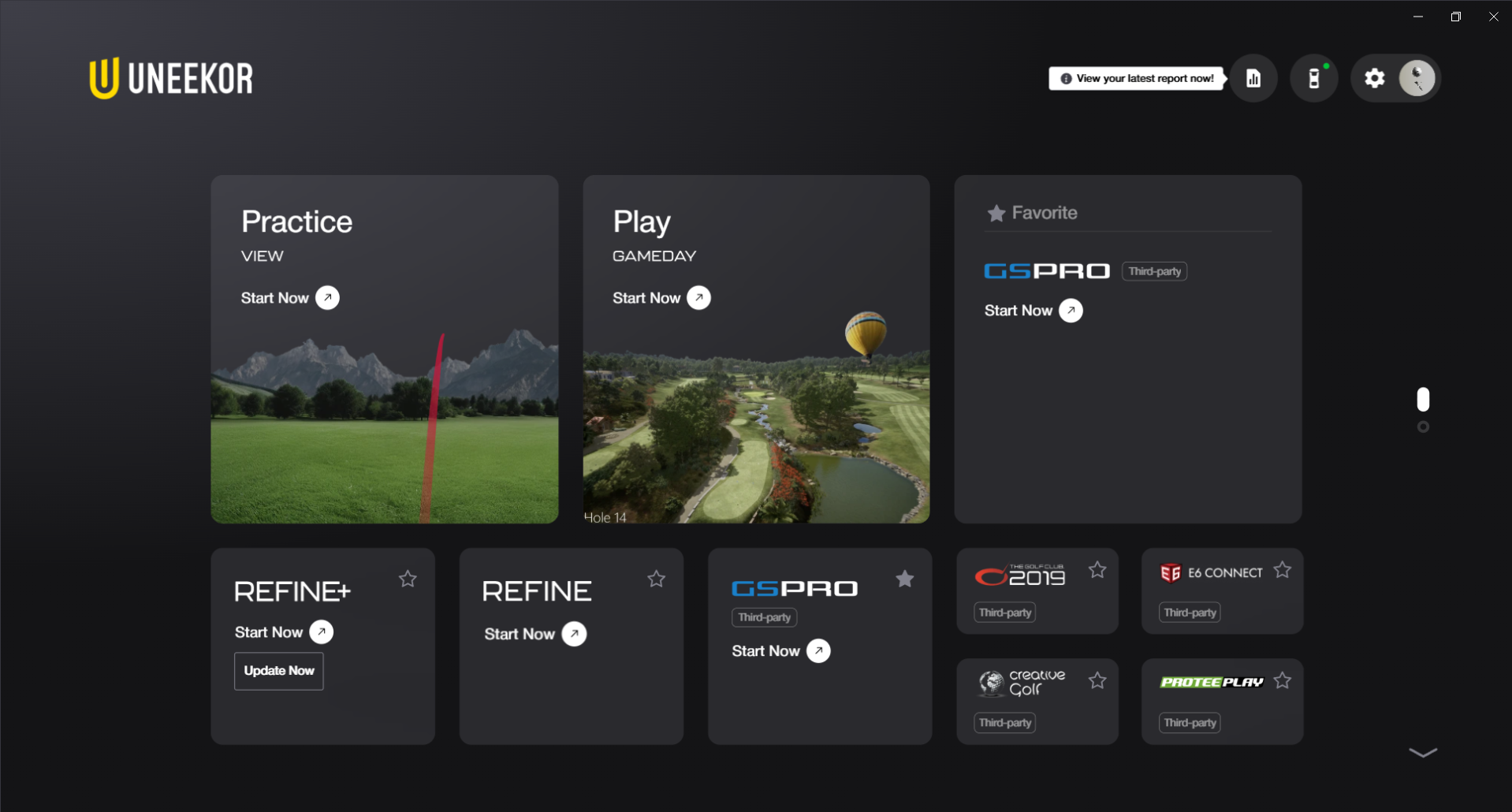
There is also a much cleaner navigation you’ll understand immediately. A vertical, page-based layout with a quick-access toolbar, to dynamic software cards allowing you to install, play, and subscribe. You will also find that launching apps is faster and more intuitive, ideal for not only home golf simulator bays but commercial sim studios also.
The best part of it all is its ease for scalability. Powered by Uneekor, Launcher 2.0 is easier to evolve as Uneekor updates roll out new content, updates, additional features and more.
A Closer Look at the Experience
The Home view helps you jump into practice or course play without hunting through menus. You’ll also see your go-to tools (including third-party favorites like GSPro and Refine+) featured as large, interactive cards for “one-click and go” sessions, perfect for indoor golf routines or quick launches in a busy sim bay. This means less time navigating, and more time swinging. For coaches, , or at-home tinkerers building out SIMKITS and enclosures, this is the control center you’ve been waiting for.
When installing a device, the guided flow covers everything from immersive device selection, visual install guides, and connection cues, to real-time detection and simplified calibration. You can even skip multi-area or trouble-mat steps if they don’t apply to your golf simulator footprint, keeping setup focused and fast. This means that regardless of if you’re pairing and EYE MINI in the garage, an EYE XO2 overhead in a commercial bay, or integrating an EYE XR with a SIMKIT, the Launcher trims the friction so you can start hitting shots sooner.
Settings have now been consolidated into a single, well-structured area with visual context, clear information hierarchy, allowing you to quickly update firmware, manage software, and configure advanced options without digging. You’ll also find badges and status indicators that make it easy to confirm connection states at a glance.
This matter for all users. For busy commercial owners, families sharing a home golf simulator, those who use their EYE MINI outdoors and more, clarity prevents mistakes and keeps the bay humming. Switching players, managing nicknames, and bulk-editing profiles with a streamlined list that shows how many profiles your subscription supports has never been easier. Personal touches, like initials-based avatars and custom launch monitor naming, help keep things organized and privacy-friendly in shared environments.
We’ve also woven news and update prompts throughout the journey to make the experience as easy as possible, while also keeping you informed.
How to Download Launcher 2.0
The next time you open your Launcher, you’ll be prompted to download Launcher 2.0 automatically. Simply follow the instructions on screen to update your software. For those who do not yet have the Launcher downloaded, or would prefer to have a direct link, feel free to click here to download the installer.
To put it simply, Launcher 2.0 turns your golf launch monitor software into a simple, unified command center. With a visual-first Home, step-by-step device setup, centralized settings, and a future-ready architecture, it’s the cleanest way to run a home golf simulator, commercial sim studio, or training bay, all while staying ready for the next wave of Uneekor updates and virtual golf innovation.
FAQs
Does Launcher 2.0 support my Uneekor launch monitor?
Yes, all Launch monitors work with the Launcher 2.0. Simply connect and manage any model such as the EYE XO2, EYE XR or EYE MINI, with visual guidance and real-time feedback during setup.
Can I still run third-party golf simulator apps like GSPro?
Absolutely. Quick-access cards make launching GSPro, E6 Connect, Creative Golf, Protee Play and more a breeze, with the dynamic install, play, and favorite states.
Can I manage profiles for family or league players?
Of course! You can create, search, sort, and bulk edit profiles with nickname display and subscription-aware limits for multi-user bays.
To put it simply, Launcher 2.0 turns your golf launch monitor software into a simple, unified command center. With a visual-first home screen, step-by-step device setup, centralized settings, and a future-ready architecture, it’s the cleanest way to run a home golf simulator, commercial sim studio, or training bay, all while staying ready for the next wave of Uneekor updates and virtual golf innovation.
Legal